Is it possible to delete a category via API in VTEX? I couldn’t find such an API in their documentation.
Hey @wanderson, how’s it going?
It’s not possible to delete just one category — you can only deactivate it or reuse it (by changing the name).
The only way to delete categories is through the full-cleanup (Manutenção de Base (Full Cleanup)).
On that page, you can clear the catalog and restart the indexer, removing all products from your store.
Just a heads-up: this process is very delicate and should only be used as a last resort, as it wipes your entire category tree.
Hope that helps — cheers!
There’s a way to do it, but I’m not sure if it has any impact… @georgebrindeiro it would be interesting to look into this.
If you edit the “parent” category, the subcategories are listed showing the Delete button. Here’s a step-by-step guide:
-
Go to: Products > Catalog > Categories;
-
Click on the “parent” category of the category you want to delete and select the edit option;
-
Scroll down the category list to the item you want to delete;
-
Click the arrow on the right and then click delete.
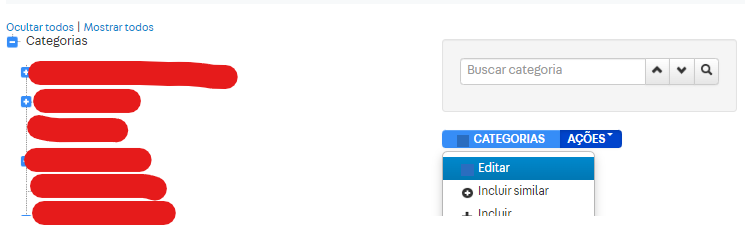

Attention: I’m not sure if this has any impact on indexing. This option doesn’t appear in the help section or in other documentation, so DEACTIVATION is recommended instead of deletion.
https://help.vtex.com/pt/tutorial/excluir-uma-categoria--tutorials_276
Hey @wanderson, how’s it going?
VTEX not only doesn’t encourage data deletion — it actually inhibits it.
Because of this internal VTEX policy, the solution for this case, as other community devs have already mentioned, will indeed be to deactivate the category by making a PUT request to the endpoint below:
https://{accountName}.{environment}.com.br/api/catalog/pvt/category/{categoryId}
With a body like the one below, where IsActive must be false:
{
    "Name": "Home Appliances",
    "FatherCategoryId": null,
    "Title": "Home Appliances",
    "Description": "Discover our range of home appliances. Find smart vacuums, kitchen and laundry appliances to suit your needs. Order online now.",
    "Keywords": "Kitchen, Laundry, Appliances",
    "IsActive": false,
    "LomadeeCampaignCode": null,
    "AdWordsRemarketingCode": null,
    "ShowInStoreFront": true,
    "ShowBrandFilter": true,
    "ActiveStoreFrontLink": true,
    "GlobalCategoryId": 604,
    "StockKeepingUnitSelectionMode": "SPECIFICATION",
    "Score": null
}
Since it’s a PUT request, in theory it should accept partial updates, but VTEX states in the documentation that all these fields are required.
Check the VTEX Category endpoint documentation.