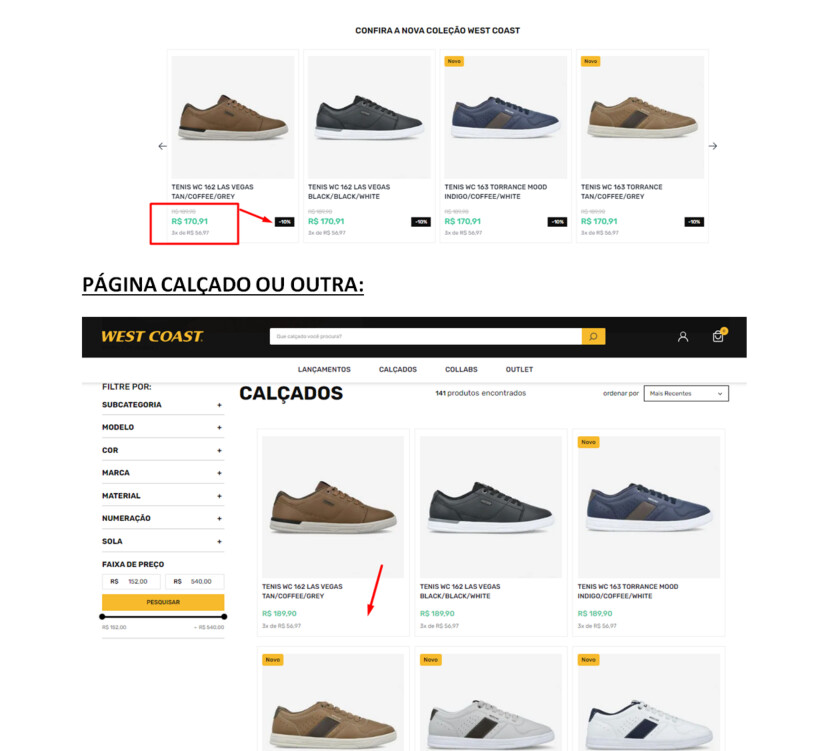
I have a store here where the client created a rule in the promotions tab in the admin.
The discount percentage shows up on the shelf and PDP, both of which use the “product-price-savings” block, but it doesn’t appear on the category page, even for the same product (see image below for visual context). All pages use the exact same “product-price-savings” block as shown below.
"product-price-savings#summaryPercentage": {
        "props": {
            "message": "{savingsPercentage}",
            "minimumPercentage": 1,
            "blockClass": "summary",
            "alwaysShow": true
        }
    }
I know the documentation recommends using the Product Highlights block, but my question is: why does it show up on the shelf and PDP but not on the category page, even though it’s the same block?
If anyone has an explanation, I’d appreciate it!
Hey @Cristiano.reis, how’s it going?
I’m not an expert on the IO development side, but apparently the product-price-savings#summaryPercentage block is configured correctly, since it’s displaying the discount on the shelf and on the product page (PDP) — just not on the category page.
Try looking into the following:
-
Block Hierarchy or Different Template: The category page might be using a different template or have a block hierarchy that overrides product-price-savings#summaryPercentage. This means that even though the same block is declared, it may not be getting called correctly in the context of the category page. Or the category shelf might even have a different shelf ID from the one being used on the PDP, for example.
-
CSS Customizations or Limitations: It’s possible that the block is present, but specific styles on the category page (or the lack thereof) are preventing it from displaying. Check the CSS applied to the categories to make sure the block isn’t being hidden or that the layout isn’t affecting its rendering.
-
Specific Conditions for the Discount: Make sure that the discount display logic (such as minimumPercentage) is working as expected across all pages. There might be a specific condition preventing it from showing on the category page.
-
Cache: The category page might be storing a cached version that doesn’t yet reflect the current configuration. Try clearing the store cache to make sure your changes are being applied correctly.
Basically:
- Check the category page template: Confirm that the
product-price-savings#summaryPercentage block is being declared correctly within the template.
- Inspect the DOM on the category page to see if the block is being loaded in the HTML but not visually displayed (this could indicate a CSS issue).
Hope this helps — if it does, please mark it as the solution to help others in the community.
Let us know if you managed to find a solution either way.
Cheers,
Estevão.
Hey, good morning! First of all, thanks for the reply.
So, options 1, 2, and 3 aren’t it because for other promotions (which I don’t know how they were created — still waiting for the client to respond) the block shows up just fine, with all the styling correct.
The issue is with promotions created directly in the promotions tab in the admin, where you can set up the rules. When I inspected the DOM, only the container tag appeared, but it was empty.
I’ll check if it might be a cache issue — if so, I’ll come back here to let you know if that was the fix.
Cheers.
@Cristiano.reis I see.
Is it the same type of promotion? Does it have payment rules?
If it’s a new promotion and has payment rules, it won’t apply.
See what VTEX says here:
It is not possible to configure the highlight for promotions that have any cart restrictions, such as:
- ZIP code range
- Accumulated purchase amount
- BIN
- Customer cluster
- Shipping type
- Payment method
- Maximum number of installments, first purchase only
These promotions are not applicable to all customers, as they require additional information (for example, the delivery ZIP code). Therefore, the highlight cannot be configured in these cases.
Documentation: Configure promotion with highlight / flag
Check if your case falls into this scenario.
I’m here if you need anything else.
Best,
Estevão.
Good afternoon, so the client created a new promotion with none of those restrictions for testing, and to confirm I also created a new workspace with a blank store-theme, and it has the same issue of the product-price-savings and product-price-list not showing up.
Apparently this error only happens with the product-summary.shelf being used by the gallery block. I switched to another block that I know is working and pulling the promotion on the home page shelf, and it still didn’t work.
I decided, together with the tech-lead, to open a ticket with VTEX to check if the problem is actually on their end, and I’ll update here with any news. For now I won’t mark it as solved yet.
Thanks and have a great week.
Best,
Cristiano
Hey everyone, we discovered it was the simulationBehavior prop in search-result-layout that was set to "skip". I changed it to "default" and that fixed the problem.