This topic aims to help customers who currently operate on a VTEX “FastStore” technology front and have questions about the “ValidateSession” and “ValidateCart” calls, which happen constantly in the store and can be inspected via Chrome DevTools > Network.
So, what are these calls and why do they exist? 
Today, the environment in which FastStore operates is decoupled from the other environments where VTEX’s Commerce APIs — such as checkout, pricing, logistics, etc. — run.
In this sense, for FastStore to be able to communicate with these modules, it’s necessary to create an integration layer between this front end and the APIs required for the end user’s shopping journey.
To address this, there is a GraphQL API layer that runs between FastStore and VTEX’s Core APIs, enabling this communication and the synchronization of certain information.
Two of the most important synchronization calls are “ValidateSession” and “ValidateCart”, which aim to sync changes related to the user’s Session and their cart information, respectively.
Below I explain in a bit more detail how each one works:
The “ValidateSession” call is a mutation in the GraphQL layer mentioned above, which seeks to validate and synchronize actions that may cause changes to the customer’s session information.
To understand what information is stored within a user’s session, I recommend reading the following documentation: Sessions System Overview
All the data mentioned in the above documentation is synchronized between FastStore and VTEX’s Sessions system through the “ValidateSession” mutation. Below is an example of the payload for this call from a logged-in user on a FastStore store:
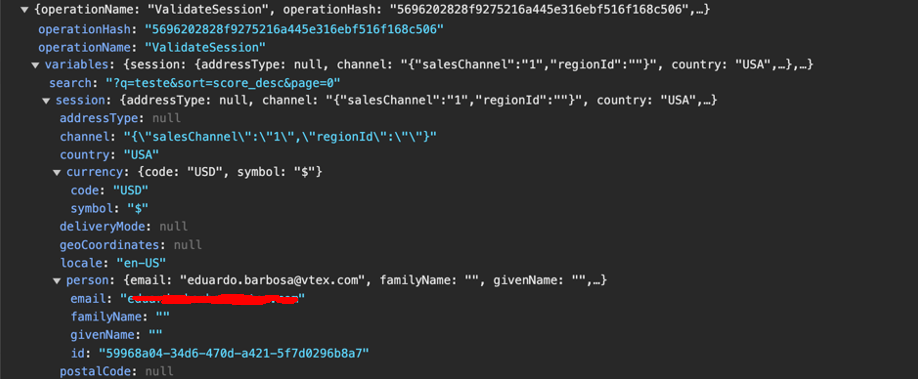
In the payload we can see information about that user’s salesChannel, country, currency, locale, email, etc.
The Network call in DevTools that represents this call is /api/graphql?operationName=ValidateSession.
As for the “ValidateCart” call, its purpose is to synchronize actions that may alter information related to a given user’s cart, which is stored within that customer’s orderForm.
Within the “ValidateCart” call payload there are two objects: “cart” and “session”. The “cart” brings the cart information itself, while “session” also pulls the user’s session data.
Within “cart” we have information about the item, the seller, the price, and the ID of that orderForm, which is found in the “orderNumber” field.
Below is an example of the payload for this call from a user with an item in their cart:
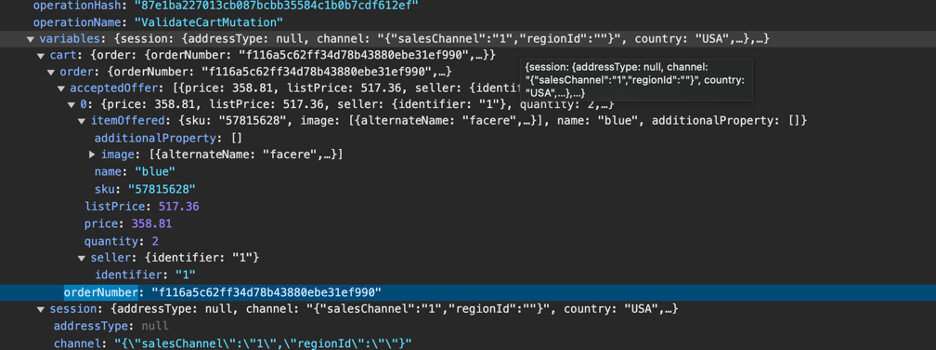
Note that all calls include an “operationHash” field, which generates an ID/hash that identifies that request.
To understand in more detail how these operations work, I recommend reading and going through the resolvers for these mutations, which are present within the FastStore package code. The links are below:
ValidateSession - https://github.com/vtex/faststore/blob/c75d1f53d7efeae52483db94d9e66ddbebb8de5f/packages/api/src/platforms/vtex/resolvers/validateSession.ts
If you still have any questions on the topic, feel free to ask here! It’ll be a pleasure to answer and help you out!