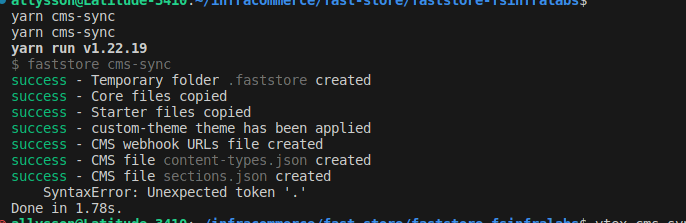
I’m following the tutorial Creating a new section, but when I run the faststore cms-sync command, I get an error at the end of the execution (image attached) and my section doesn’t show up in the CMS.
Hey @allyssonalmeida, how’s it going? Are you using nvm to manage your node versions? If so, we went through this problem recently too.
These two issues helped us understand the problem and solve it.
npm ERR! Unexpected token '.' with with nvm-windows <= 1.1.7 · Issue #4234 · npm/cli · GitHub (path to solution)
Good afternoon,
I tested the scenario from the solution/link you provided and it didn’t work. I’m still getting the Unexpected Token “,” error when trying to run faststore cms-sync. I can’t figure out how to fix it no matter what. Can you help me?
Good afternoon again, and to close this topic I found the root cause of the problem and the solution:
In a conversation with VTEX, I analyzed that the problem was related to the Node.js version linked to the VTEX IO CLI. To fix the issue, simply uninstall the VTEX IO CLI and reinstall it while using a more recent version of Node.js, preferably above version 18. When the VTEX IO CLI is installed, it binds to your currently installed Node.js version on your machine, meaning that if it’s an older version, it will cause issues because it requires TypeScript features that only appeared in more modern versions.
I hope this helps everyone.