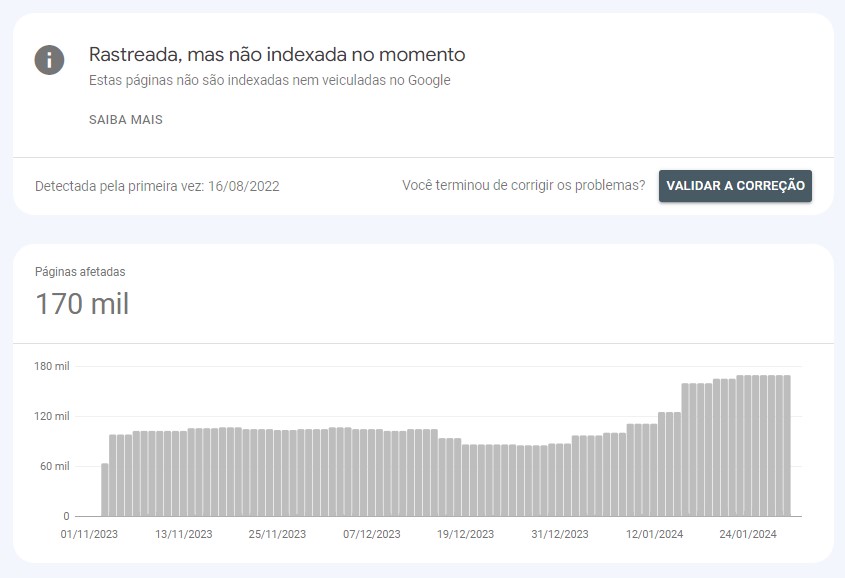
In our Search Console we’ve been running into a major Soft 404 issue with this parameter (&map=ft), as well as pages flagged as “Crawled and not indexed”. On top of that, we have over 140,000 of these pages being indexed by Google, which is hurting our SEO.
I’d like to understand how and why VTEX creates these pages, so we can think about solutions. From an SEO standpoint, we have the option of applying a 410 status and deindexing them from Google, but we’d like to know how this “comes to be”.
From what I understand, these are pages with search context. It’s worth checking the code to see if there’s any logic binding the search context parameter to pages, and whether it’s being picked up on any URL randomly due to a logic error.
However, if the page is part of one of these versions (category, collection, search term, product specification, etc.), the parameter will be added automatically by VTEX itself.
This parameter also appears when you have a product specification field as a filter. VTEX adds this parameter automatically.
In the case you mentioned — a blog post and a product page — it really doesn’t make sense for the parameters to be added unless there’s some collection or term indexed in the search.
This example here: /chaveiro-exclamacao0068609/camiseta%20masculina?_q=camiseta%20masculina&map=ft loads a search page for men’s t-shirts.
However, if you remove the beginning, leaving only this: /camiseta%20masculina?_q=camiseta%20masculina&map=ft it will go to the original category page, but will return the same products.
In general, you can try working with your SEO team to use Robots and avoid indexing this type of page/parameter.
Let’s dig deeper into the topic based on your comments.
Yes, we’ve already applied it in the Robots.txt, but Google still ends up indexing these pages. My idea is to eventually add a noindex tag to the pages and also apply 410 on the URLs to speed up deindexing as well.