Hey folks, I’d like some help — I’m trying to create a trigger to notify changes on the Cliente data entity, just for testing purposes for now.
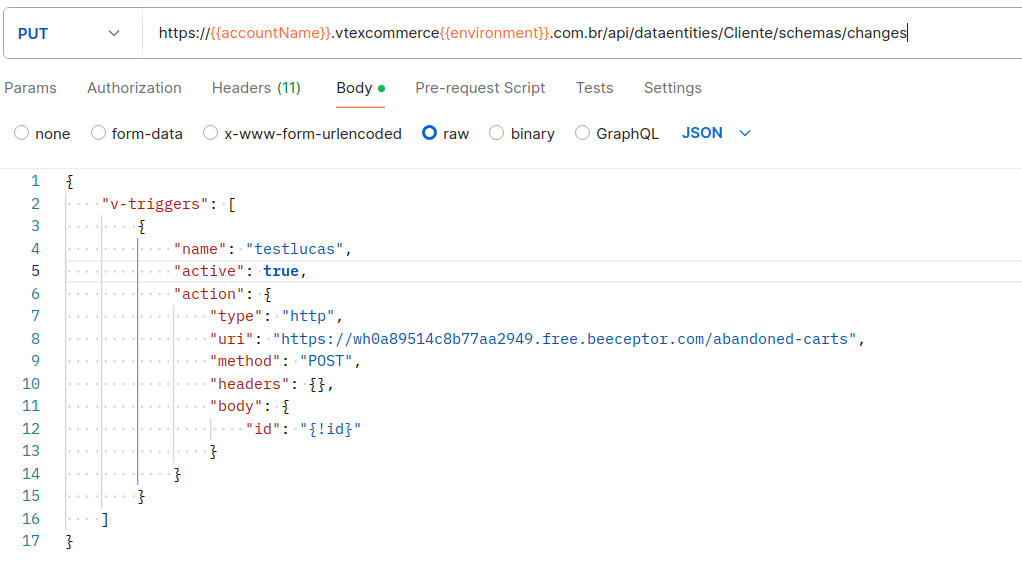
I configured the trigger, the details are in the image below, but no requests are reaching my endpoint. Any idea what could be causing this?
@lucas.santos2 Hope you’re doing well!
1. Check the Trigger Configuration:
v-triggers: Make sure the trigger structure is correct, including all required fields such asname,active,action,type,uri,method,headers, andbody.uri: Verify that the endpoint URL is correct and accessible. Try accessing the URL directly to confirm it’s available and ready to receive POST requests.
2. Test the Endpoint Independently:
- Try sending a request manually to the endpoint using Postman or cURL to check whether the endpoint is working correctly and receiving requests.
3. Logs and Monitoring:
- Beeceptor Monitoring: Since you’re using Beeceptor, check whether the request log in Beeceptor is enabled and whether there are any failed or pending requests.
- VTEX Logs: Check the Master Data logs in VTEX to see if any errors or issues are recorded when attempting to send the notification.
4. Permissions and Authentication:
- Make sure your VTEX environment has the correct permissions to send requests to the specified endpoint.
- Check whether any additional authentication or security headers need to be configured for the target endpoint.
5. Business Rules in Master Data:
- Verify that the business rules configured in Master Data are triggering the trigger as expected. If the trigger is associated with a specific entity or operation, make sure those conditions are being met.
6. Test Request Verification:
- When making a manual change to the
dataentity(in this case,Cliente), check whether the change fires the trigger as expected. - Make sure the “id” field is being correctly passed in the request
body. This is required to identify the document that triggered the trigger.
7. Syntax Review:
- Check the JSON syntax in the trigger body. Simple syntax errors can cause silent failures when executing the trigger.
Also, @georgebrindeiro left a response here Trigger Master Data V1, V2 - #2 by georgebrindeiro that might help you out.
Additional docs: Setting up triggers in Master Data v2
If it still doesn’t work, I’d suggest opening a support ticket to investigate further.
Hope this helps!
Cheers,
Estevão.
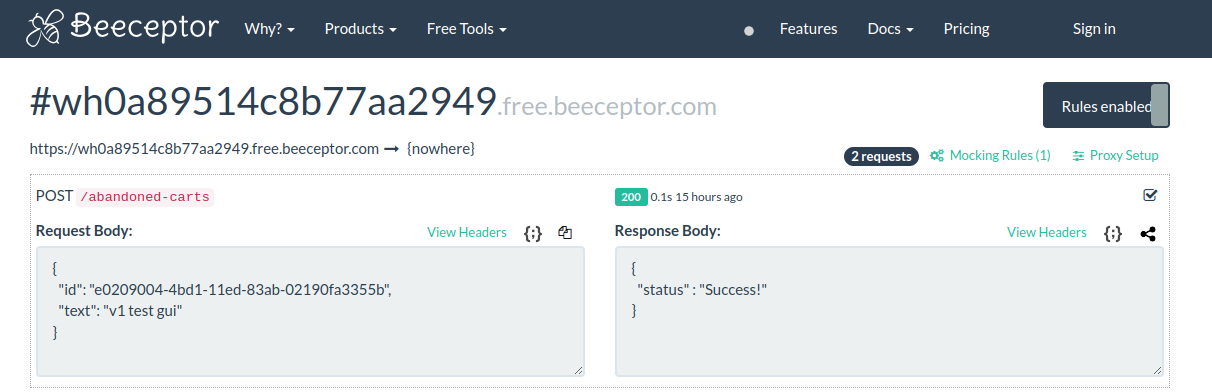
@lucas.santos2 got it.
This could indeed be an issue with the MasterData API V2.
If you prefer — as I mentioned — you can open a support ticket so they can look into this more thoroughly.
Feel free to let us know if you find a solution.
Cheers,
Estevão.
The Client entity does not exist by default in Master Data v2, only in Master Data v1 (CL). Therefore, to test triggers with this entity, you would need to follow the step-by-step guide to setting up triggers in Master Data v1.
The data entities of both versions are independent, meaning data created in a v1 entity cannot be queried or edited using v2 resources, and vice versa.
To use triggers in Master Data v2, you would need to create an entity with that name and then follow the guide at Setting up triggers on Master Data v2.